The Async Mistakes That Quietly Break .NET Applications

Few features have done more to improve .NET applications, or caused more subtle bugs, than async and await. The syntax makes asynchronous code look almost identical to synchronous code, which is exactly its genius and exactly its danger. Because it hides so much machinery behind two keywords, developers reach for it confidently while carrying misconceptions that produce deadlocks, thread exhaustion, and swallowed exceptions — failures that are hard to reproduce and harder to diagnose. Understanding what async actually does, and the mistakes that most reliably break applications, is essential for anyone writing serious .NET code.
What await actually does
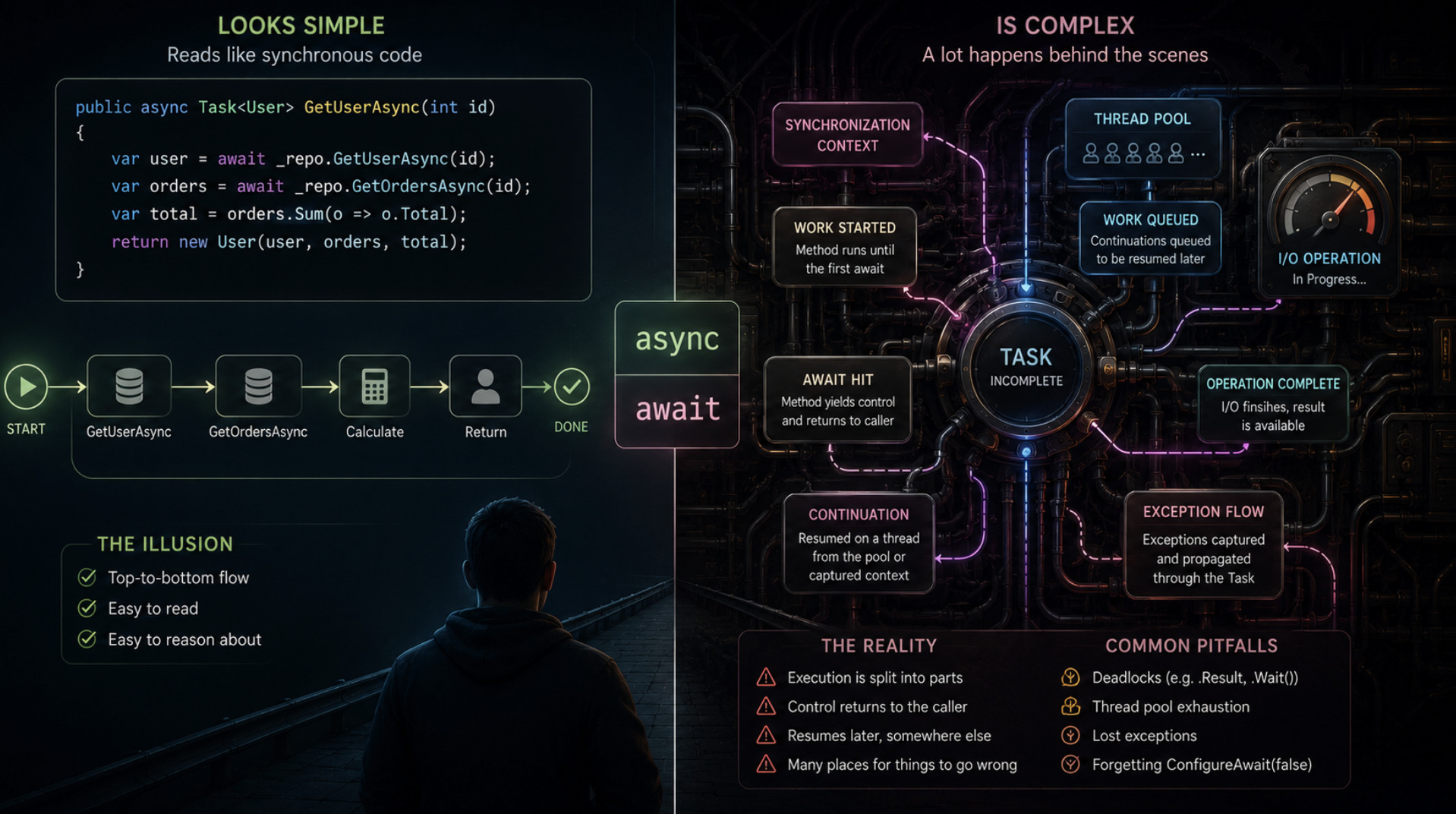
The first misconception to clear away is that async makes code run on another thread. It does not, not by itself. The purpose of async and await is not parallelism but the efficient use of threads during waiting. When code awaits an operation — a network call, a database query, a file read — the thread is released back to do other work instead of blocking idle until the operation completes. When the awaited operation finishes, execution resumes. The benefit is scalability: a server can handle far more concurrent requests because threads are not sitting blocked, waiting.
This distinction matters because it corrects the mental model that causes so many errors. Async is about not wasting threads while waiting for I/O, not about spinning up new threads to do CPU work. Understanding that await releases the current thread and resumes later — potentially on a different thread — is the foundation for reasoning about everything that can go wrong. The elegance of the syntax, which makes asynchronous code read like ordinary sequential code, conceals this behaviour, and it is precisely the gap between how the code reads and what it does that trips developers up.
The blocking deadlock
The most notorious async mistake is blocking on asynchronous code — calling something like .Result or .Wait() on a task instead of awaiting it. This looks harmless and often works in simple cases, which is what makes it dangerous, because in certain contexts it produces a deadlock that hangs the application. The mechanism involves the synchronization context: in some environments, the awaited operation tries to resume on the original context, but that context is blocked waiting for the very task to complete, and the two wait on each other forever.
The rule that prevents this is simple to state and important to follow: async all the way down. If a method is asynchronous, it should be awaited, not blocked on, and the async nature should propagate up through the call chain rather than being cut off by a synchronous block somewhere in the middle. Mixing blocking and asynchronous code is where these deadlocks are born. The temptation to block appears when a developer wants to call async code from a synchronous method and reaches for .Result as a shortcut; that shortcut is the trap. Keeping the call chain asynchronous end to end is the discipline that avoids one of the most common and baffling failures in .NET.
Async void and the exceptions that vanish
A second serious mistake concerns the return type of async methods. An async method should return a task, so that the caller can await it and observe its completion and any exceptions. But the language also permits async void, and this is a trap in almost every case. An async void method cannot be awaited, which means the caller has no way to know when it finishes or whether it failed — and, critically, an exception thrown from an async void method cannot be caught by the caller in the normal way and can crash the process.
The consequence is exceptions that silently vanish or bring down the application unpredictably. Because the failure is disconnected from the calling code, it is exceptionally hard to trace. The guidance is to avoid async void entirely, with one narrow exception: event handlers, whose signatures require void and which therefore have no alternative. Everywhere else, an async method should return a task. This single rule eliminates a whole class of invisible failures, because it keeps exceptions observable and completion trackable. When you see async void outside an event handler, you are almost always looking at a latent bug waiting to swallow an error at the worst possible moment.
Fire-and-forget and unobserved work
Related to async void is the pattern of starting asynchronous work and not awaiting it — fire-and-forget. Sometimes this is intentional, but it is far more often a mistake, and it carries real risks. When a task is started and never awaited, any exception it throws goes unobserved, potentially disappearing without a trace, and the application has no knowledge of whether the work succeeded, failed, or even completed before the surrounding operation ended. Work launched this way can be silently abandoned mid-flight.
The danger is that the code appears to work — the calling method returns promptly, the operation seems to proceed — while errors are being swallowed and completion is uncertain. In a web application, fire-and-forget work started during a request may be terminated when the request ends, leaving it half-done. The discipline is to be deliberate: genuinely asynchronous work should be awaited so its outcome is observed, and the rare cases where fire-and-forget is truly intended should be handled explicitly, with proper error handling, rather than by simply neglecting to await. Unawaited tasks are a quiet source of lost work and hidden failures precisely because nothing complains when they go wrong.
ConfigureAwait and library code
A more advanced but consequential consideration is what happens when an awaited operation resumes. By default, in some contexts, it attempts to resume on the original synchronization context, which is the behaviour desired in application code that needs to return to a particular context. In library code, however, this default is often unnecessary and can contribute to the deadlocks and performance problems discussed above. This is what the ConfigureAwait mechanism addresses, allowing code to indicate that it does not need to resume on the original context.
The practical guidance follows the distinction between application and library code. Library code, which should not depend on any particular calling context, generally benefits from indicating that it does not require the original context on resumption, which avoids forcing a return to a context it does not need and reduces the risk of the blocking deadlock. Application code closer to the framework may legitimately need the original context. The mistake is being unaware of the behaviour entirely, writing library code that unnecessarily captures a context and thereby becomes more prone to deadlock and less efficient. Awareness of how resumption works is what separates robust asynchronous library code from code that behaves unpredictably depending on who calls it — a concern for exactly the kind of maintainable design discussed in dependency injection lifetimes and the captive dependency trap.
Conclusion
Async and await transformed .NET by making scalable, non-blocking code as readable as synchronous code, but that same readability hides the machinery that, misunderstood, breaks applications. The core insight is that await is about releasing threads during waiting, not about running work on new threads, and nearly every serious mistake follows from losing sight of it. Blocking on async code invites deadlocks, which "async all the way down" prevents. Async void severs exceptions and completion from the caller and should be avoided outside event handlers. Fire-and-forget quietly swallows errors and abandons work unless made deliberate. And awareness of how awaited operations resume separates robust library code from deadlock-prone code. None of these mistakes announces itself clearly; they produce the intermittent hangs, vanished exceptions, and lost work that are the hallmark of misunderstood async. Understanding what the keywords actually do, and following the handful of disciplines that flow from that understanding, is what keeps asynchronous .NET code both fast and correct.